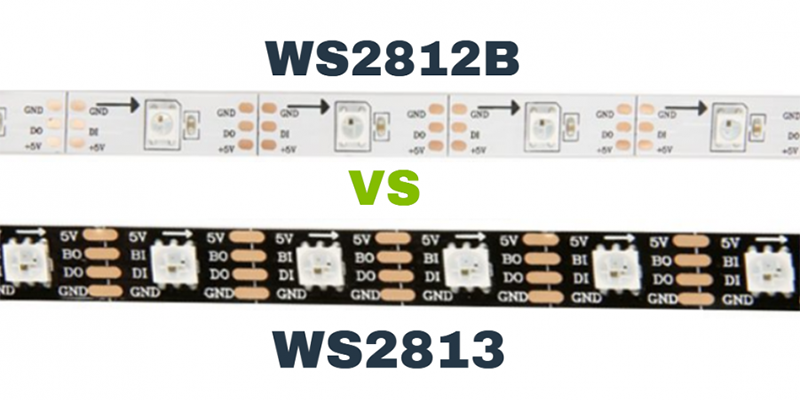
The WS2813 solves WS2812B’s biggest pain: signal breakage from a single LED failure.
WS2813 adds a backup data line to the WS2812B, preventing total strip failure from one broken LED.
If you care about stable lighting performance, you’ll want to understand how these two differ.
What is the difference between WS2815 and WS2811?
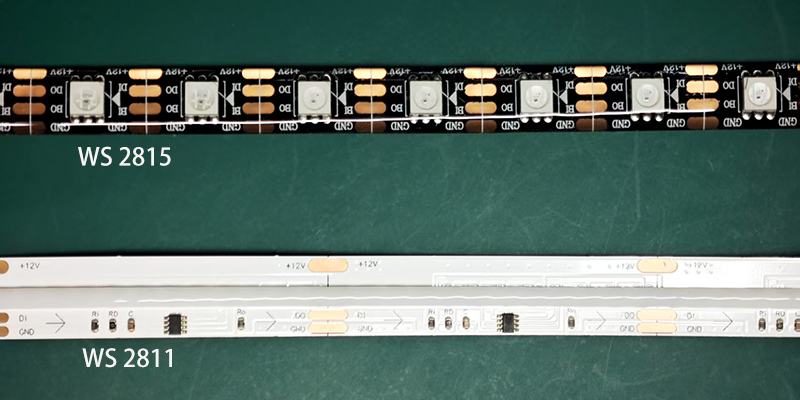
WS2815 integrates the control IC into the LED; WS2811 is separate.
WS2815 combines RGB LED and IC in one package, WS2811 requires external RGB LEDs.
Integration level
WS28151 is easier to work with because it integrates both the LED and control chip2. WS28113 needs a separate RGB LED and control IC setup. That means WS2815 reduces board space and simplifies wiring.
| Model | LED+IC Integrated | External Control IC | Typical Use Case |
|---|---|---|---|
| WS2811 | ❌ | ✅ | Outdoor signs, long runs |
| WS2815 | ✅ | ❌ | Consumer LED strips |
Signal protocol and control
WS2815 uses a higher-frequency single-wire protocol that needs tighter timing. WS2811 operates at a lower frequency and is slightly easier to drive for beginners.
So in short, WS2815 is a cleaner package, but WS2811 gives more control flexibility at the cost of complexity.
What is the difference between WS2813 and 2815?
WS2815 uses 12V power input; WS2813 uses 5V.
WS2815 supports longer runs due to higher voltage, while WS2813 is easier to power for small projects.
Voltage matters
The key difference is voltage. WS2813 is a 5V chip, while WS2815 works with 12V. This directly affects voltage drop and wiring.
| Model | Voltage | Backup Data Line | Use Case |
|---|---|---|---|
| WS2813 | 5V | ✅ | Short to medium indoor projects |
| WS2815 | 12V | ✅ | Long runs, outdoor installations |
Trade-offs in power and brightness
With WS2815, I can run 5–10 meters without adding power injection. WS2813 requires frequent power boosts after 2–3 meters. However, WS2813’s 5V system is easier to pair with microcontrollers like Arduino or Raspberry Pi without voltage regulation.
In my experience, I choose WS2815 when cable length and voltage drop are critical. For everything else, WS2813 does the job well at lower cost.
What is the difference between WS2813 and WS2814?
WS2814 adds a white LED channel for true RGBW output.
WS2814 is RGBW, while WS2813 is RGB-only, both with dual-signal redundancy.

RGB vs RGBW output
The main difference lies in the LED color channels. WS2813 has red, green, and blue (RGB). WS2814 adds a dedicated white channel (W), creating RGBW output.
| Model | Color Output | Voltage | Backup Line | Best Use Case |
|---|---|---|---|---|
| WS2813 | RGB | 5V | ✅ | Visual effects, animations |
| WS2814 | RGBW | 12V | ✅ | Soft white lighting, decoration |
Applications and control
If you want warm or pure white in addition to colors, WS28144 is the right choice. It’s ideal for architectural lighting. On the other hand, WS2813 provides vibrant color effects but mixes white using RGB, which may not look as clean.
I once worked on a gallery lighting project5 where WS2813 looked too "harsh" when trying to replicate warm tones. We switched to WS2814, and the soft white output completely changed the atmosphere.
Is WS2812B RGB or RGBW?
WS2812B is RGB only.
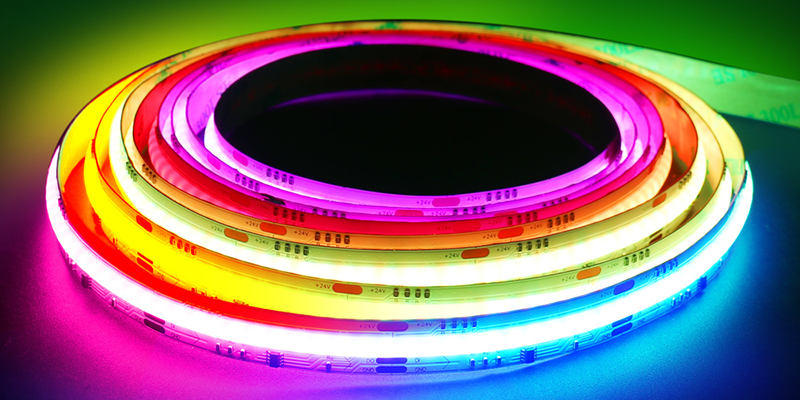
WS2812B has three channels: red, green, and blue; it does not support RGBW.
Color capabilities
The WS2812B cannot output a dedicated white channel. It blends RGB to approximate white, but it’s not the same. For true white output, I would look at RGBW6 chips like SK6812 or WS2814.
| Model | RGB | RGBW | Voltage |
|---|---|---|---|
| WS2812B | ✅ | ❌ | 5V |
| WS2814 | ✅ | ✅ | 12V |
Output quality
Using RGB to simulate white often results in a bluish or tinted tone. This is fine for many effects, but not ideal for lighting that needs accurate color rendering. If you’re designing ambient room lighting, this matters more than it seems.
What is the WS2813 protocol?
WS2813 uses a single-wire protocol with dual signal redundancy.
WS2813 uses one data wire and one backup line to continue working if a pixel fails.

How the dual-signal system works
Unlike WS2812B, WS2813 has both DI (data input) and BI (backup input). If the main signal fails at one LED, the data flows through the backup line.
| Model | Backup Line | Data Rate | Signal Format |
|---|---|---|---|
| WS2812B | ❌ | 800kbps | One-wire |
| WS2813 | ✅ | 800kbps | One-wire + BI |
Reliability in long runs
This dual-signal architecture saved one of my installations. During a client showroom setup, one LED in the middle broke. With WS2812B, everything after it would’ve stopped. But with WS2813, the strip kept working past that point. I didn’t even have to open the ceiling panel.
How to drive WS2813?
WS2813 can be driven by 5V-compatible microcontrollers with precise timing.
WS2813 requires a 5V signal, tight timing, and a backup data input to function properly.
Microcontroller compatibility
The most common drivers are Arduino (UNO, Nano), ESP8266, and ESP32. You must use libraries like FastLED or Adafruit_NeoPixel to manage timing.
Things to prepare before wiring
- A 5V DC power supply (current based on LED count)
- Capacitor (1000uF, 6.3V+) across power lines
- Resistor (330Ω) on the data line
- Proper grounding between power, strip, and controller
| Item | Recommended Value |
|---|---|
| Voltage | 5V |
| Capacitor | 1000uF or higher |
| Resistor | 330 ohm on data line |
| Library | FastLED or Adafruit_NeoPixel |
Dual input wiring
WS2813 has two inputs per LED: DI and BI. The microcontroller only sends data to DI, but the BI is internally connected from the previous pixel. No special coding is needed, but make sure physical wiring is correct.
Conclusion
WS2813 improves reliability over WS2812B, adds redundancy, but both are 5V RGB LEDs with different fault tolerance.
-
Explore the benefits of WS2813 LED strips, including ease of use and integration, to enhance your projects. ↩
-
Discover how integrating LED and control chips can simplify designs and improve efficiency in lighting applications. ↩
-
Learn about the differences between WS2811 and WS2813 to make informed decisions for your LED projects. ↩
-
Explore the advantages of WS2814 for architectural lighting to enhance your projects with warm and pure white options. ↩
-
Discover best practices for gallery lighting to create the perfect atmosphere and enhance art displays effectively. ↩
-
Exploring RGBW LED chips can enhance your understanding of true white output and improve your lighting designs. ↩