Your client wants a "gamer" room. They show you videos of setups with dazzling, flowing colors. You install some basic RGB strips, but the result is static and underwhelming. It’s just a room with some colored lights, not the immersive, high-tech command center they dreamed of.
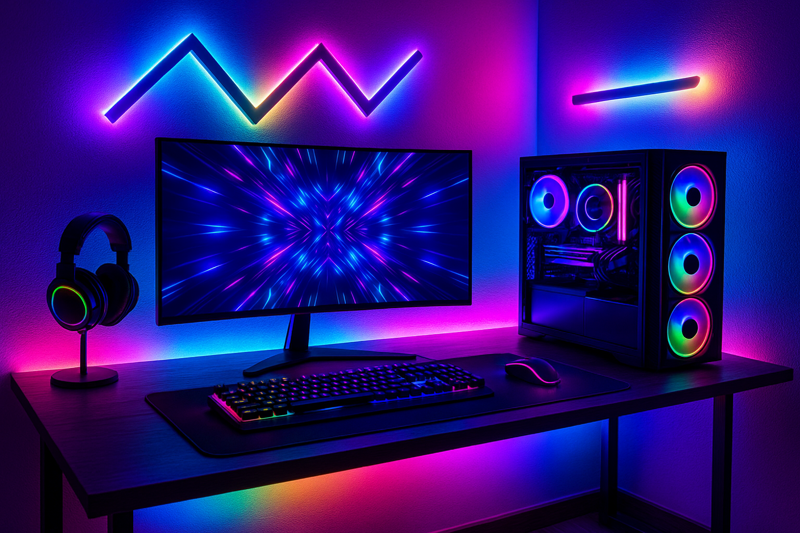
The secret to a next-level gaming setup is using addressable RGBIC (Independent Chip) strips and layering them strategically. This technology allows for dynamic, flowing, multi-color effects that can sync with the game on screen, transforming the entire room into an extension of the virtual world.
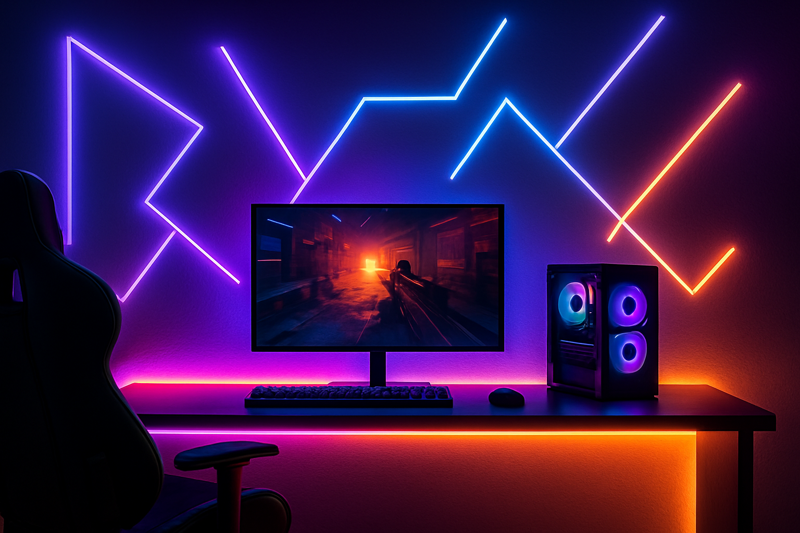
I remember a contractor calling me about a home renovation project. The client was a software executive who wanted to convert a spare bedroom into a high-end gaming room and streaming studio. The contractor admitted, "Jermey, I’m lost. I know how to light a kitchen, but this is a different world." He was about to install simple RGB strips. I stopped him. I explained the difference between standard RGB and addressable RGBIC. We designed a system using our RGBIC strips behind the monitor, under the desk, and in channels on the wall, all running back to a single smart controller. Two weeks later, he sent me a video. The lights were mirroring the colors on the screen as his client played a racing game. The whole room flashed red and blue when police lights appeared in the game. His text message simply said: "You just made me look like a genius. This is the coolest thing I’ve ever built."
What’s the Difference Between Regular RGB and True "Gaming" Strips?
The client is disappointed. The lights you installed can only show a single color at a time across the whole strip. They can’t produce the rainbow or chasing effects they see in online videos, making their expensive new setup feel basic and outdated.
Standard RGB strips can only be one color at once. For dynamic gaming effects, you must use addressable RGBIC (Red, Green, Blue, Independent Chip) strips. Each LED on an RGBIC strip can be controlled individually, allowing for flowing gradients, chasing rainbows, and complex scenes.

Think of it this way, which is how I explain it to my clients: a standard RGB strip is like a string of old-fashioned Christmas lights. If you set them to blue, every single bulb on the string turns blue. You have no other choice. An RGBIC strip is like the programmable light show on a modern skyscraper. Each individual light (or small section) is a pixel that can be told what to do independently. One can be red while the one next to it is green, and the next is blue. This "independent chip" is what allows a controller to send complex signals down the strip, creating the mesmerizing flowing and chasing effects that define a modern gaming aesthetic. For Tom, explaining this distinction to a client immediately establishes him as the expert. It’s the difference between offering a basic product and a sophisticated solution.
Decoding the Technology: Not All Color is Created Equal
Choosing the wrong type of strip is the most common mistake installers make when entering this space. Understanding the fundamental differences is crucial for meeting client expectations. This isn’t just an upgrade; it is a completely different technology class.
| Strip Type | How It Works | Best Use Case | Gaming Performance |
|---|---|---|---|
| RGB | All LEDs are on one circuit. The entire strip must be the same color at any given time. | Basic accent color for coves, shelves, or static mood lighting. | Poor. Cannot produce flowing, chasing, or multi-color effects. Lacks true immersion. |
| RGBW | Same as RGB, but adds a dedicated white chip. Can be a single color (R, G, or B) or a pure, high-quality white. | Excellent for multi-purpose rooms where you need both accent color and functional white light. | Poor. Has the same limitations as RGB for gaming effects. |
| RGBIC (Addressable)1 | Each LED or small group of LEDs has its own microchip, allowing for individual control. | The Gaming Standard. Essential for screen mirroring, music visualization, and dynamic effects. | Excellent. This is the core technology for creating the immersive, responsive lighting gamers want. |
When sourcing for a gaming project, the term you need to look for is "addressable" or the specific chip type, like WS2812B2 or SK6812. These are industry-standard ICs (Integrated Circuits) that allow for the individual pixel control. Standard RGB strips use a simple 4-pin connector (+, R, G, B). Addressable RGBIC strips use a 3-pin connector (Power, Data, Ground). Recognizing this simple hardware difference can save you from ordering the wrong product for the job.
How Do You Light the Desk and Monitor Area for Peak Performance?
The gamer’s desk is a chaotic mess of glare. The bright monitor in the dark room is causing headaches and eye strain, while the light from their new RGB strips is reflecting off the screen, making it hard to see the action.
Create a "cocoon" of indirect light around the monitor. Apply a bias light (a neutral white or RGBIC strip) to the back of the monitor to reduce eye strain, and place another strip along the back edge of the desk for a soft, ambient under-glow. The goal is zero direct glare on the screen.

There is real science to this. Bias lighting is a technique that has been used in professional video editing suites for decades. By placing a soft, neutral light source behind a screen, you increase the ambient light in your field of view. This makes your pupils contract slightly. As a result, the bright light from the monitor itself feels less harsh, which significantly reduces eye fatigue during long sessions. It also has a surprising secondary benefit: it improves the perceived contrast of the screen. The blacks will look deeper and more detailed because they are being compared to the soft light behind them instead of the pure black of a dark wall. For Tom, this is a powerful selling point. He’s not just selling pretty colors; he’s selling a performance and comfort upgrade. He can tell his client, "This won’t just look cool; it will help you see more clearly and play for longer without getting a headache."
The Command Center: A Pro-Level Desk Setup
The desk is the heart of the gaming room. The lighting here must be both aesthetically pleasing and ergonomically sound.
-
Mastering Bias Lighting:
- What to Use: While a 6500K (daylight white) strip is the technical standard for color-accurate video work, for gaming, an RGBIC strip3 offers the best of both worlds. The user can set it to a neutral white for competitive play or have it dynamically mirror the colors on the screen for immersive single-player experiences.
- How to Install: Create a rectangle of light on the back of the monitor, about 2-3 inches in from the edges. This ensures the light is spread evenly without creating a distracting "halo" that is visible from the front. Most monitors have a flat surface perfect for applying the strip’s adhesive backing. Ensure the USB or power cable is routed neatly with the other monitor cables.
-
Creating the Desk Under-Glow:
- What to Use: A second RGBIC strip. This one should be synchronized with the bias light to create a cohesive effect.
- How to Install: Mount the strip along the back edge of the underside of the desk, facing down or back towards the wall. This hides the light source completely. The light will bounce off the wall and floor, creating a soft, floating effect for the entire desk. This is also a fantastic way to subtly illuminate and show off the tower of a custom PC on the floor.
-
Cable Management4 is Key:
- A high-tech setup with messy, visible wires looks cheap. The low-voltage wires for LED strips are thin and easy to hide. Use adhesive clips, raceways, or zip ties to bundle the LED wiring with the computer cables. A clean installation is what separates a professional job from a DIY mess.
How Do You Extend the Experience to the Whole Room?
The desk looks amazing, but it feels like an isolated island of light. The rest of the room is dark and disconnected, which shatters the sense of immersion the client is trying to create.
Treat the entire room as a canvas. Use LED strips in aluminum channels to create bold geometric patterns on the walls, place them on the back of floating shelves to highlight collectibles, and install them in ceiling coves to wash the entire room in synchronized color.

I consulted for a designer working on a game room for a professional streamer. The goal was to create a visually interesting background for his broadcasts. We designed a feature wall behind his desk using black aluminum channels and our RGBIC strips. We ran them in a series of interconnected hexagonal shapes, like a honeycomb. When it was off, it looked like a cool, graphic art piece. But when it was on, he could have dynamic, flowing patterns moving through the shapes. It created an incredible, high-tech backdrop that looked amazing on camera. By using the channels, we turned a simple LED strip into a rigid, architectural fixture. This is the key: think beyond just sticking the strip to a surface. Use channels and diffusers to shape the light and make it a deliberate part of the room’s design.
Building the "Battlestation": Room-Scale Ideas
Taking the light off the desk and putting it onto the walls and ceiling is what creates a truly immersive "battlestation."
- Architectural Light Lines5: This is a very popular high-end technique.
- How it Works: Use surface-mounted or recessed aluminum channels with a milky diffuser cover. The RGBIC strip goes inside. This turns the flexible strip into a solid, architectural bar of light. You can then mount these bars on the walls to create any shape you want: long horizontal/vertical lines, triangles, hexagons, or abstract patterns that lead the eye around the room.
- Floating "Display" Shelves6: Gamers often have collectibles, figurines, or memorabilia.
- How it Works: Install simple floating shelves and run an RGBIC strip on the back edge, shining up the wall, or on the bottom edge, shining down. This back-lighting technique makes the shelves "pop" and turns a simple collection into a curated museum-style display.
- The Cloud Ceiling: A visually stunning and popular DIY trend that a professional can perfect.
- How it Works: This involves attaching clumps of polyester fiber fill (pillow stuffing) to the ceiling to create a 3D cloud effect. RGBIC strips are then woven throughout the clouds. When turned on, the light diffuses through the fiber, and dynamic effects can make it look like a rolling thunderstorm or a magical nebula. It’s a show-stopper.
- Portal Framing: Outline a doorway, entryway, or the frame around a wall-mounted TV with a strip of light. This creates a dramatic "portal" effect that adds another layer of depth to the room’s lighting design.
How Do You Sync Everything for a Truly Interactive Experience?
The client has multiple light strips, each with its own remote or app. The colors don’t match, and nothing reacts to the game. The "immersive" room is just a frustrating mess of uncoordinated, blinking lights.
Use a centralized, PC-based software controller. Programs like SignalRGB or OpenRGB can detect all your compatible lighting hardware (strips, fans, keyboards) and synchronize them. They can mirror your screen’s colors or integrate directly with games for reactive, real-time lighting effects.
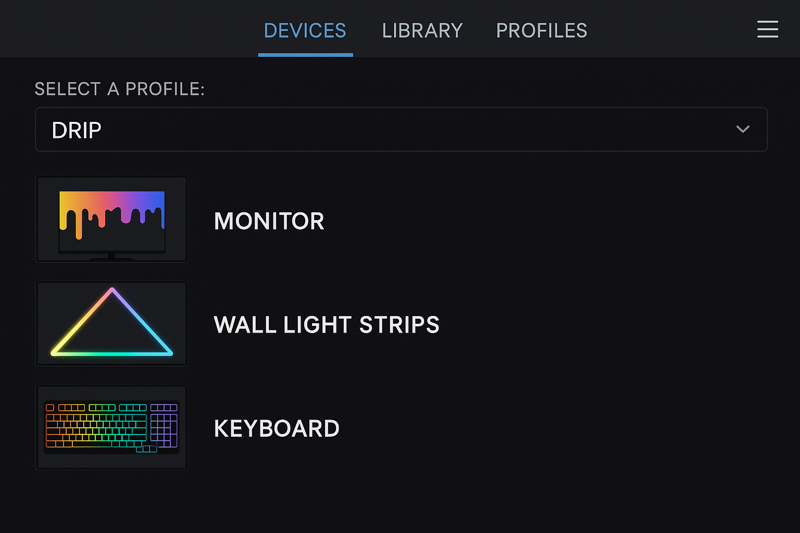
This is the final piece of the puzzle that brings everything together. The magic isn’t just in the lights themselves; it’s in the control system. I had a client who was an expert installer but not a PC gamer. He didn’t understand why his customer wasn’t happy with the rainbow effects he had programmed. I remotely logged into the client’s PC with him and installed the software. We configured it to "screen mirror." We launched a game, and as the character ran from a green forest into a blue cave, the entire room’s lighting shifted from green to blue automatically. The installer had an "aha!" moment. He finally understood that the goal is not to just program a light show, but to make the lights an extension of the screen.
The Brains of the Operation: Synchronization and Control
A truly ultimate experience is an automated and reactive one. This requires connecting your addressable RGBIC strips to a controller that can be managed by a PC.
-
Hardware Controllers7: Your RGBIC strips will connect to a small controller box. This box translates software commands into the data signal the strip needs. These controllers typically connect to the PC via an internal USB header or an external USB port. Brands like Arduino or custom ESP32 controllers are popular in the DIY space, but for professional installs, look for pre-built controllers compatible with the major software platforms.
-
Software Ecosystems8: This is where the magic happens.
- Screen Mirroring (Ambilight): This is the most common and impressive effect. The software analyzes the edges of your screen in real-time. If the edge of the game is a fiery orange from an explosion, the lights in that part of the room will turn orange. It makes the game feel like it’s bleeding out of the monitor and into the room.
- Direct Game Integration: Many popular games output lighting data directly. The software can use this data for hyper-specific effects. For example, the lights might flash red when you take damage, turn green when you’re healed, or flash a specific color when a special ability is ready.
- Music Visualization: The same software can make the lights react in time with music, turning the room into a personal nightclub.
To Tom, you can pitch this as the "smart" part of the smart lighting system. It’s the brain that makes the entire installation feel alive and intelligent.
Conclusion
A gaming room is an emotional space, an escape. Your job is to build that escape. By using the right technology (RGBIC), applying it with purpose (bias lighting, room mapping), and unifying it with smart software, you can create a truly unforgettable and immersive experience for your clients.
-
Explore this link to understand how RGBIC technology enhances gaming experiences with dynamic lighting effects. ↩
-
Learn about WS2812B strips to discover their versatility and how they can elevate your lighting projects. ↩
-
Explore this link to understand the benefits of RGBIC strips for enhancing your gaming experience with dynamic lighting. ↩
-
Check out this resource for expert tips on cable management to keep your gaming area tidy and professional. ↩
-
Explore this link to discover how Architectural Light Lines can transform your space with stunning, customizable lighting designs. ↩
-
Check out this resource to learn how Floating Display Shelves can elevate your collectibles and create a museum-like ambiance. ↩
-
Explore this link to discover top-rated hardware controllers that enhance your RGBIC strip experience. ↩
-
Learn how software ecosystems can transform your RGBIC lighting setup into an immersive experience. ↩